You show up.
We keep track.
Log every set as you train, in the order you did it. Ask your history anything with Forge. Bring your AI assistant along if you like. That's it.

Log it as it happens
Start a session, add what you're doing and tick each set off as you go. Type a duration when you're done. Everything stays editable after.
- Warmup, working, drop and failure sets. Record reps, weight, distance, time, rpm, rest and RPE.
- Targets as ranges. Aim for 6–8 reps, then see what you actually did beside it.
- Last time as targets. Add an exercise and start with a set for each one you did last time.
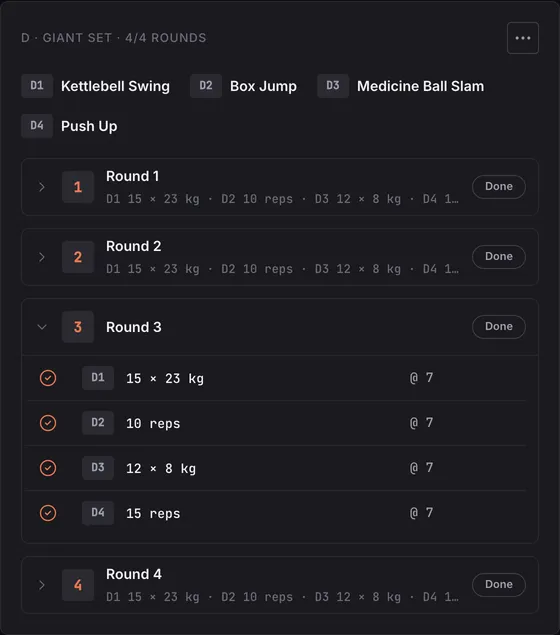
- Supersets, circuits and giant sets. Plan the rounds. Done rounds count themselves from the sets you tick.
- Repeat a session. Run it again from a new start time.
Ask your training anything
Pick the columns, add a filter, choose a window and run it. No code needed, though you can switch to Write and type the query yourself. Show it as a table, a line, bars or one number, and save the ones you check often.

Every exercise, tracked its own way
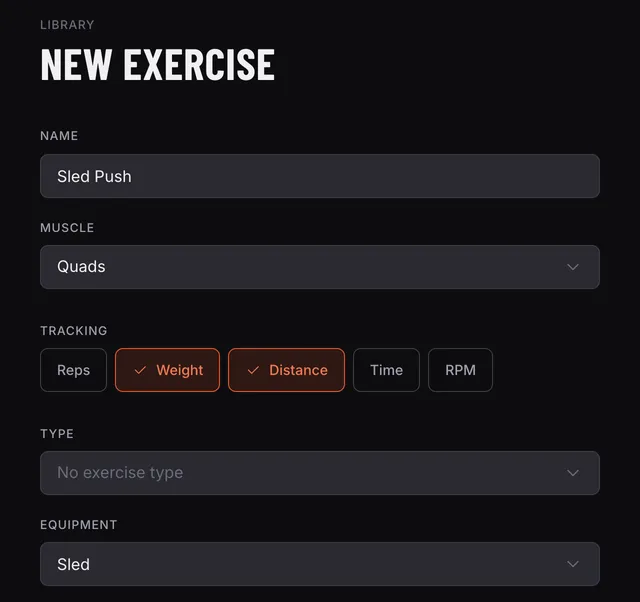
A sled push is weight and distance. A bike sprint is time and rpm. Tell each exercise what its sets record, and logging asks for exactly that.
Start with the starter catalogue, or from empty, and add your own with a muscle, type, equipment and instructions.
What you can ask
- Ask about your training
What's my best bench in the last 4 weeks?
- Log it by saying it
I did 5 sets of 5 squats at 100 this morning. Felt hard.
- Plan the next one
Repeat Monday's session, aiming at what I lifted last time.
Your training, in every conversation
Connect Claude, ChatGPT or another AI assistant to Embark. It reads your sessions and bests, and logs what you did, all from a chat. Embark keeps the numbers. Your assistant does the thinking.
- Answers come from your real sessions and sets, not guesses.
- It sees your own training, and nobody else’s.
- Read only, or read and log: you choose when you create the token.
- It shows you what it will delete, and asks first.
- Revoke it any time and it stops working within a minute.
Training more than yourself?
MAX is for personal trainers, coaches, teams and groups: everyone you train in one workspace. Each person keeps their own record, and you see all of it.
Your next session
starts here
Edge Solo is free. Create an account with your email, pick your units, and log your first set.